Opening an online bank account no longer means giving up a lunch break to sit in a branch lobby. If you have a smartphone, a government-issued ID, and about 15 minutes, you can often finish the whole process from your couch.
This guide shows you how to open a bank account online, from choosing the right institution to making your first deposit. You’ll also learn which documents to have ready, which mistakes trip people up, and how to protect yourself once you’re in.
First, let’s look at why so many Americans are making the switch.
Why Choose an Online Bank Account?
Online banks skip the cost of running hundreds of physical branches. Many pass some of that savings on through lower fees and, often, higher savings rates. That varies by institution, so it pays to compare.
Convenience matters too. You can check balances, move money, deposit a check with your phone camera, and freeze a lost card at 2 a.m. without talking to anyone. A well-chosen online bank account can also bundle budgeting tools that older banks charge extra for or don’t offer at all.
One note on terminology. Some providers are full online banks with their own charter. Others are fintech apps that partner with a chartered bank behind the scenes. If that distinction feels fuzzy, our explainer on what is a neobank clears it up.
What You Need Before You Apply
Federal rules require banks to verify who you are before they open an account. That’s why the application asks for more personal details than you might expect. Gather these items first:
- Your full legal name and date of birth
- A physical US street address (many banks won’t accept a PO box as your only address)
- A Social Security number or Individual Taxpayer Identification Number (ITIN)
- A valid government-issued photo ID, such as a driver’s license, state ID, or passport
- A working email address and mobile phone number
- A way to fund the account, such as a debit card or an existing bank account
Having everything within reach keeps you from timing out halfway through the application.
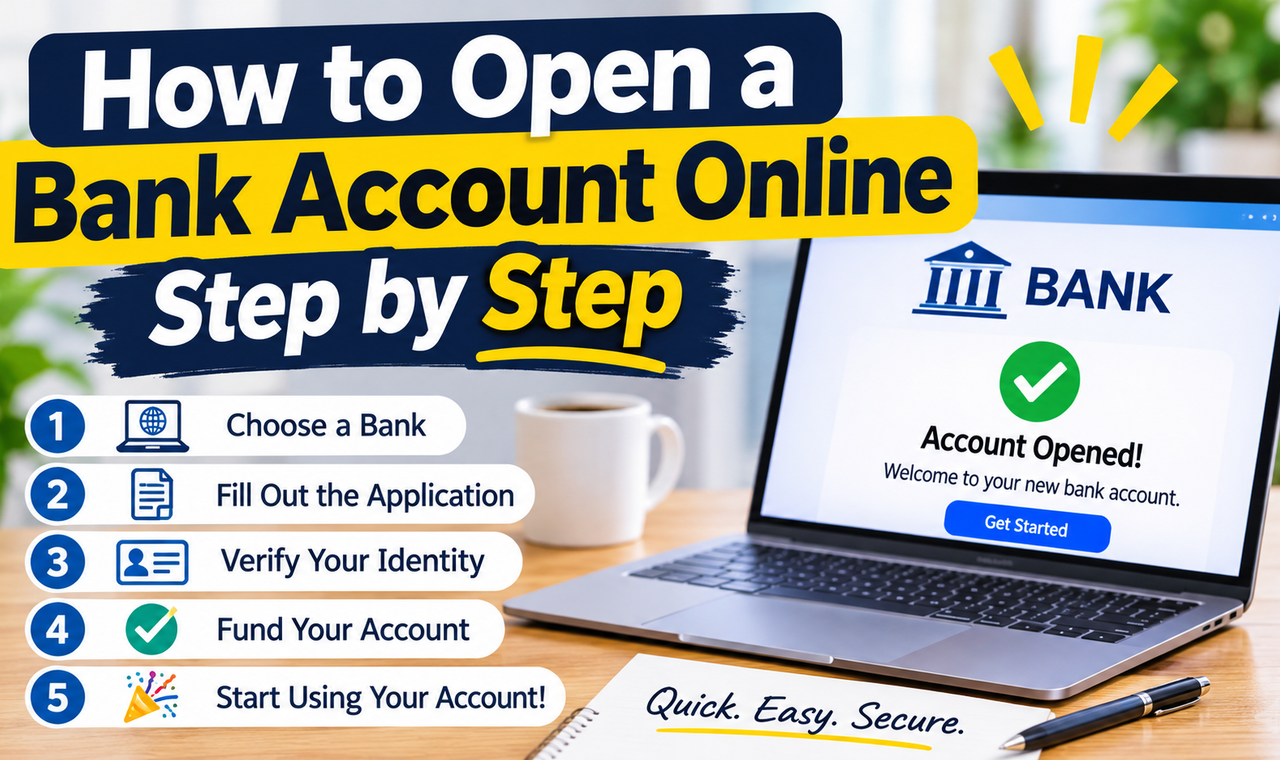
How to Open an Online Bank Account: 7 Simple Steps
Follow these steps in order and you’ll avoid most of the usual snags.
Step 1: Decide What You Need From the Account
Start with purpose. A checking account handles everyday spending and bill payments. A savings account is built for money you want to set aside. Many people open both at the same bank so transfers are quick.
If you’re unsure which features deserve your attention, sort your priorities with a needs vs wants approach. A must-have might be no monthly fee. A nice-to-have might be a sign-up bonus. Investopedia’s overview of a checking account is a handy refresher on the basics.
Step 2: Confirm the Bank Is FDIC-Insured
This is the safety check you shouldn’t skip. The FDIC insures deposits up to $250,000 per depositor, per insured bank, for each account ownership category. You can confirm a bank’s status with the FDIC’s BankFind tool and read how coverage works on the FDIC deposit insurance page.
Credit unions are insured by the National Credit Union Administration (NCUA) instead. If you’re considering a fintech app, find out which partner bank actually holds your money and check that bank’s status.
Step 3: Compare Fees, Rates, and Features
Don’t pick the first name you recognize. Line up two or three options and compare:
- Monthly maintenance fees, and how to waive them
- Overdraft and insufficient-funds fees
- ATM access and out-of-network ATM charges
- The annual percentage yield (APY) on savings
- Minimum opening deposit and minimum balance requirements
- The quality of the mobile app
The Consumer Financial Protection Bureau offers plain-language guidance on choosing and managing a bank account. It’s worth ten minutes before you commit.
Step 4: Gather Your Documents
Pull out the items from the checklist above and keep them on your desk. If you’ll upload a photo of your ID, find a well-lit spot and a flat surface so the image comes out sharp. Blurry photos are a surprisingly common reason for delays.
Step 5: Complete the Application
Go to the bank’s official website or download its app from the Apple App Store or Google Play. Type the web address yourself instead of clicking a link in an ad or email.
Enter your details exactly as they appear on your ID. A mismatch, like a nickname instead of your legal first name, is one of the most common reasons applications stall. Before you submit your online bank account application, read the account agreement and fee schedule. Yes, really read them.
Step 6: Verify Your Identity
Many banks verify you automatically using the information you entered. Some ask you to upload ID photos or take a selfie. Others may ask security questions drawn from your records.
If the automated check fails, don’t panic. You may be asked for extra documents or to contact support, which can add a few days.
Step 7: Fund the Account and Set It Up
Once your online bank account is approved, make your first deposit. Depending on the bank, you can link an existing account, use a debit card, or mail a check. Then finish the setup:
- Turn on two-factor authentication
- Enable transaction and low-balance alerts
- Activate your debit card when it arrives
- Set up direct deposit if you want your paycheck to land here
Keep your old account open until your direct deposits and automatic bill payments have fully switched over. Closing it too early is a classic way to trigger a missed payment.
Online Bank vs. Traditional Bank vs. Neobank
Here is how an online bank account stacks up against the other common options. Features vary by provider, so treat this as a general guide.
| Feature | Online Bank | Traditional Bank | Neobank (Fintech App) |
|---|---|---|---|
| Physical branches | Few or none | Many | None |
| Typical fees | Often lower | Often higher unless waived | Varies, often low |
| Savings rates | Often higher | Often lower | Varies |
| Deposit insurance | FDIC-insured if a chartered bank | FDIC-insured | Through a partner bank; verify |
| Cash deposits | Limited (partner ATMs or retail locations) | Easy at branches and ATMs | Limited |
| In-person help | Phone, chat, app | Branch staff | Chat or app |
| Best for | Saving and everyday banking | Face-to-face service, cash-heavy needs | Budgeting tools, simple mobile banking |
Pros and Cons of an Online Bank Account
Pros
- Lower fees are common
- Higher savings rates are often available
- Access to your money 24/7 from your phone
- Fast, paperless application
- Useful built-in tools like alerts and spending trackers
Cons
- Depositing cash can be inconvenient
- No branch to visit when something goes wrong
- Support relies on phone, chat, or email
- Some banks hold new deposits for several days
- Fintech apps may not be banks themselves
So, is an online bank account right for you? If you’re mostly digital with your money and rarely handle cash, probably yes. If you deposit cash weekly or like talking to a teller, keep a traditional account alongside it.
Common Mistakes to Avoid When You Open an Online Bank Account
- Skipping the fee schedule. A “free” account can still charge for overdrafts, paper statements, or inactivity.
- Not checking FDIC or NCUA coverage. A slick app is not proof your money is insured.
- Treating every online bank account the same. APYs, ATM networks, and cash-deposit options differ a lot.
- Chasing a sign-up bonus blindly. Bonuses often require a minimum direct deposit or balance for a set period. Read the terms first.
- Using public Wi-Fi to apply. Your Social Security number deserves a private connection.
- Closing your old account too soon. Move direct deposits and autopays first.
- Reusing passwords. A strong, unique password plus two-factor authentication is your first line of defense.
Make Your Online Bank Account Work Harder
Opening the account is the start, not the finish. A high-yield savings account at an online bank is a natural home for an emergency fund. Even modest balances grow faster at a better rate, and our guide to the Rule of 72 shows how quickly compounding can double money over time.
Remember what a savings account is for. It suits money you can’t afford to lose or expect to need soon. For longer-term goals, think through your risk tolerance before moving beyond insured deposits. Your online bank account is the foundation, not the whole house.
How to Keep Your Online Bank Account Secure
Online banking is generally safe when you build good habits:
- Use a unique password and a password manager
- Turn on two-factor authentication
- Never share one-time codes, even with someone claiming to be the bank
- Log in only through the official app or website
- Review your transactions weekly and report anything unfamiliar right away
Banks rarely call to ask for your full password or login code. If a message creates sudden panic, hang up and contact the bank using the number on your card.
Frequently Asked Questions
Is an online bank account safe?
It can be, as long as the institution is FDIC-insured (or NCUA-insured for credit unions) and you follow basic security habits. Confirm coverage through the FDIC’s BankFind tool before you deposit anything.
Can I open a bank account online without a Social Security number?
Many banks require an SSN or ITIN. Some accept other identification, especially for non-residents, but policies vary widely. Check the bank’s requirements or contact support before applying.
How long does it take to open an online bank account?
The application itself can take around 15 minutes if you have your documents ready. Approval is often quick, but identity checks or document reviews can add days. Funding and card delivery take additional time.
Will opening a bank account hurt my credit score?
Opening a standard checking or savings account usually doesn’t involve a hard credit inquiry. Banks may still review your banking history through specialty reporting agencies. Check the application disclosures to see what the bank looks at.
Can a minor open an online bank account?
Most banks require a parent or guardian as a joint owner for anyone under 18, though rules differ by bank and state. Look for youth or custodial account options.
How do I deposit cash into an online bank account?
Options vary. Some banks partner with ATM networks or retail locations. Others suggest buying a money order and depositing it by mobile check capture. Confirm the method, and any fees, before you open the account.
Final Thoughts
Opening an online bank account is one of the simplest money moves you can make. Decide what you need, confirm the bank is insured, compare fees, gather your documents, apply, verify, and fund. That’s the whole process.
The real value comes afterward. A good online bank account makes saving easier, cuts fees, and puts your money in your pocket instead of behind a branch door.
Pick one account type this week, compare two or three insured options, and start your application. Then explore more guides on Growwxritik to keep building your money skills.
Disclaimer: This article is for educational purposes only and is not financial, legal, or tax advice. Banking products, fees, and requirements change, so verify details with the institution and consult a qualified professional for your situation.